




Adobe Photoshop CS3 Portable (Windows)
Still miss a lighter version of Photoshop that won’t bog down your laptop? Adobe Photoshop CS3 Portable is a ready-to-use photo editor that, in my view, remains one of the lightest alternatives. This older release still handles basic photo editing and graphic design well, since the core tools haven’t changed much. I’ve put the download link and installation steps below. 🔥
What made CS3 stand out at the time was Camera RAW support, so you could work with RAW files without extra tools. It also added the Quick Selection Tool to select objects faster and more accurately.
As I remember, Smart Filters were here too, so you could readjust effects anytime without damaging the original photo. Nostalgic? This software is very old now, though. I’m not sure whether it still works.
I think CS3 is best suited to lower-end or mid-range laptops, but many newer features are missing for modern work. If you’d prefer a newer version, Adobe Photoshop 2024 is an option.
Download Adobe Photoshop CS3 Portable from the link below; it’s only about 100 MB. 😁
Latest Features and Download Links:
- Full Adobe Camera RAW support for processing RAW files.
- The new Quick Selection Tool makes object selection faster.
- Updates to Curves, Channel Mixer, Vanishing Point, Brightness, and Contrast.
- Black-and-white conversion adjustment effects.
- Auto Align and Auto Blend for combining photos.
- All-new Smart Filters.
- Improved cloning and healing tools for retouching.
- Optimized 32-bit and HDR support.
- Faster startup and overall performance.
- ImageReady was removed, with its features integrated into Photoshop.
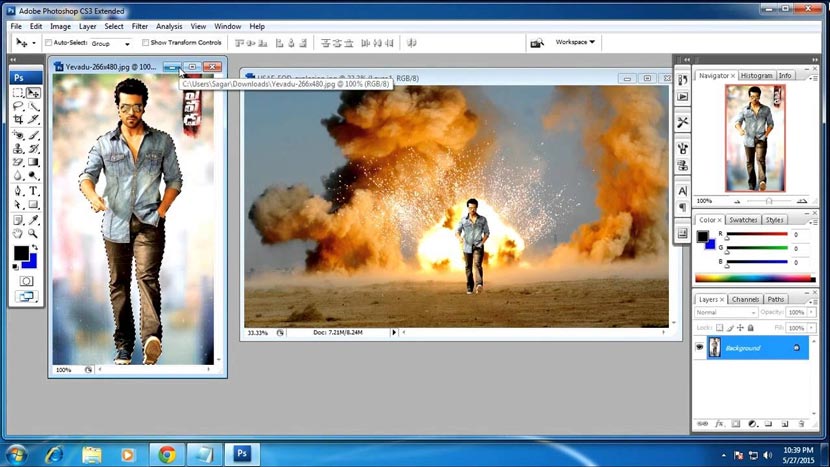
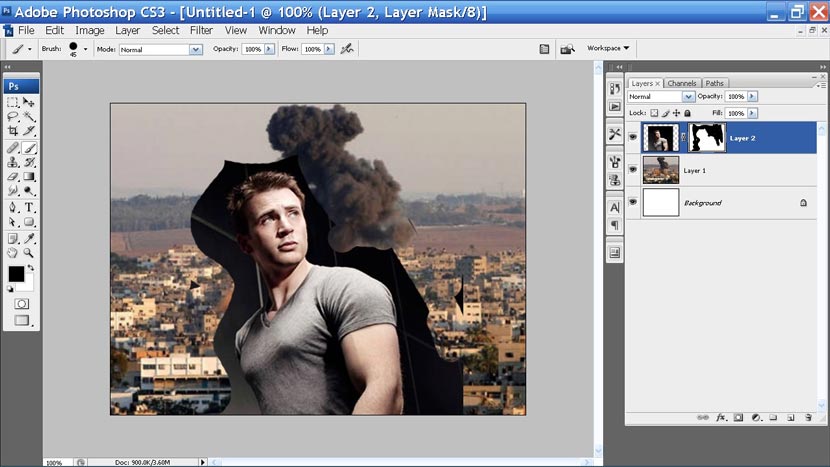
User Interface Preview:
System Requirements:
| Component | Minimum |
|---|---|
| Operating System | Windows XP SP2 or Windows Vista (32-bit) |
| Processor | Intel Pentium 4 or compatible |
| RAM | 512 MB |
| Storage | 1 GB of free space |
| Display | 1024 x 768 with 16-bit color |
| Graphics Card | 64 MB VRAM for 3D features in the Extended version |
Steps to Install Photoshop CS3 Portable on Your PC:
- Download pscs3portable_yasir252.com.rar (100 MB) from the link below.
- Extract it with WinRAR (Archive password: www.yasir252.com).
- Run the .exe file as Administrator.
- If an error appears on Windows 10, right-click the .exe file and select Properties.
- Enable Windows 7 compatibility mode. Done! 😁
