



Adobe GenP Patch Download – Universal CGP (v4.0.4)
Seeing that “Unlicensed” pop-up right when you are deep into color grading in Premiere is just… man, it makes me want to chuck my mouse across the room! If you are looking for Adobe GenP Patch v4.0.4 to fix your Creative Cloud 2026 apps, you are in the right place.
YASIR252 is sharing this tool and its download link today. It can help you bypass those license errors.
I remember back in 2022 when life was so simple with pre-activated versions. Especially during the Creative Suite era when we all used AMTEmulator without a care in the world. But now? Their security wall is getting ridiculously high. Honestly though, the internet always finds a way.
GenP Patch is basically the modern ninja way to test out Adobe apps without the headache. It works, and it is fast. Why do not just buy the license? Then you look at the monthly bill. Ouch. Prices keep climbing every year and it is getting hard to keep up.
Most of us just want to learn Adobe Premiere Pro 2026 or mess around with some edits. It is not like we are all doing high-end commercial work yet, right? That is exactly why the GenP Patch exists. 😊
Download Adobe GenP Patch Full Version for free below to activate your Adobe CC 2026 suite. Just a heads up: disable your Windows Defender first. Seriously. It will delete it immediately if you do not. 😂
Adobe GenP Patch v4.0.4 Latest Features
- Unlocks every single premium feature without limits.
- Scanning for installed files is way faster now.
- Improved PowerShell scripts to kill those annoying config bugs.
- Fixed that weird ARM detection typo that caused errors.
- It works perfectly for After Effects 2026 and InDesign.
- Photoshop 2026 and Premiere Pro support included too.
- Full compatibility with the newest Adobe Illustrator 2026.
- Runs on everything from Windows 7 to the latest Windows 11.
How to Use Adobe GenP Patch on Windows PC
- Download Adobe GenP Patch for free using the link below.
- Extract the .rar file using WinRAR.
- Turn off your antivirus and kill your internet connection for a sec.
- Right-click the Patch file and Run as administrator.
- Hit the SEARCH button to find your Adobe install folder.
- Wait for the list of files to show up on your screen.
- Tick the checkboxes for the apps you actually want to patch.
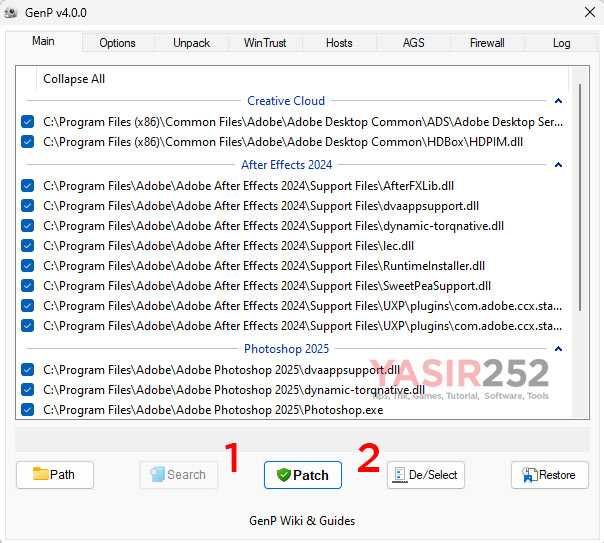
- Click the PATCH button and let it do its thing.
- Success!

Fixing the “Unlicensed Adobe App Is Not Genuine” Error
- Open the GenP tool again.
- Enter WinTrust TAB -> Click the Toggle WinTrust button
- Enter Hosts TAB -> Click the Update hosts button
- Enter AGS TAB -> Click the Remove AGS button
- Enter Firewall TAB -> Click the Add Rules button
- Those annoying genuine notifications should vanish.
If they are still there, try the next steps.
- Click Restore Hosts, then Edit Hosts.
- Copy the block list from this BLOCK HOST CODE ADOBE link.
- Paste those lines at the very bottom of your Host file.
- Optional: Toggle Reg Key.
- Done! Hopefully, everything runs smooth now. 😅
NOTE: If you are still using Adobe CC 2018 or older, use AMTemu Patcher instead.
Adobe GenP Patch Download v4.0.4
www.yasir252.com